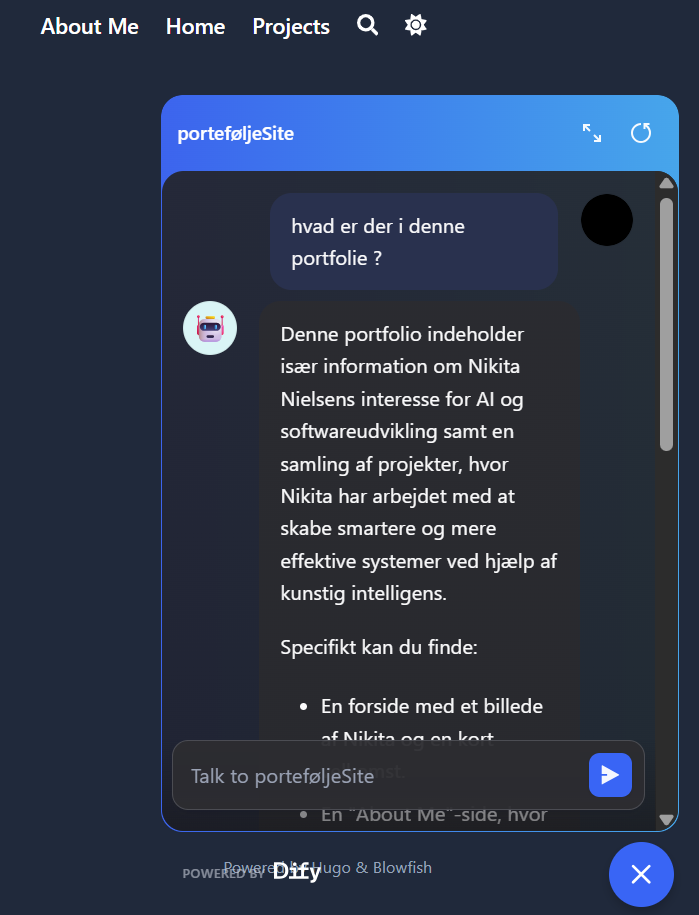
Project Overview#
This project is a RAG chatbot integrated directly into my portfolio website.
The goal was not only to build a chatbot, but to make it understand and answer questions about my own portfolio content.
The chatbot uses Retrieval Augmented Generation (RAG), meaning it answers based on my own data instead of only relying on general AI knowledge.
Live Integration on My Website#
A key part of this project is that the chatbot is fully integrated into my portfolio website.
Users can:
- ask questions directly on the site
- get answers based on my projects and content
- interact with the chatbot in real time
This makes the portfolio more interactive and demonstrates a real-world AI application.
What the Chatbot Does#
Instead of answering freely, the chatbot:
- receives a question from the user
- sends the request to a backend API
- retrieves relevant information from my portfolio data
- generates a contextual answer
This ensures that answers are:
- relevant
- based on my own work
- more reliable than a standard chatbot
System Architecture#
This project is built as a complete pipeline consisting of frontend, backend, and AI system.
1. Data Collection#
- My portfolio website is crawled using a Java application
- A sitemap is used to find all pages
- Content is extracted using Jina Reader
- The text is cleaned and converted into markdown
2. Knowledge Base (RAG)#
- The extracted content is stored in Dify Knowledge
- The text is split into chunks
- The chunks are converted into embeddings
- This enables semantic search across my portfolio
3. Backend (API Layer)#
- A Java backend server handles requests
- The backend exposes a
/chatendpoint - It securely connects to the Dify API
- API keys are stored using GitHub Secrets
4. Frontend Integration#
- A custom chat interface is added to my Hugo portfolio
- The frontend sends user questions using JavaScript (Fetch API)
- The chatbot response is displayed directly on the website
Technologies Used#
- Hugo – portfolio website
- GitHub Pages – hosting
- JavaScript (Fetch API) – frontend communication
- Java (VS Code) – backend API and crawler
- Spark Java – lightweight API server
- Dify – RAG system and chatbot
- Jina Reader – content extraction
- GitHub Actions (Secrets & Variables) – secure API key handling
Why RAG is Useful#
RAG makes it possible for the chatbot to:
- answer based on real data instead of guessing
- reduce hallucinations
- provide domain-specific knowledge
- connect AI to custom content
At the same time, I learned that:
- good data quality is very important
- chunking and retrieval strategy matter a lot
- wrong context can still lead to weak answers
What I Learned#
Through this project, I learned:
- how a full RAG pipeline works in practice
- how to connect a frontend, backend, and AI system
- how APIs are used to integrate AI into real applications
- how to handle requests, encoding, and data flow
- how to test and deploy a working AI system
This project showed me that building AI applications involves much more than just using a model — it requires a complete system.
Reflection#
This project felt like a real-world AI application, not just a demo.
By integrating the chatbot into my own website, I created something that:
- is interactive
- demonstrates my technical skills
- can be used by other people visiting my portfolio
It also gave me a much better understanding of how modern AI assistants are built and connected to real data.
GitHub Repository#
Screenshots#