Project Overview#
For this project, my group and I want to work on a digital booking system for E.G.’s Christmas market.
After the customer meeting with E.G., I found the Christmas market case especially interesting because it has a clear real-world problem. There are many stand holders, many emails, many practical wishes, and a lot of manual work involved in keeping everything organized.
The goal of the project is to make the process easier for the person handling the Christmas market planning, while also making the signup process more structured for the stand holders.
This project is still in the planning phase, so this post is about our current ideas, technology considerations, AI usage and scope.
Problem#
The concrete problem we want to solve is the email correspondence and manual handling of stand bookings for the Christmas market.
Right now, a lot of the information about stand holders, wishes, placement, and booking details seems to be handled manually. This means that Lise has to go through signups one by one and keep track of many details herself.
This can quickly become time-consuming, especially when many stand holders need to be managed at the same time.
By building a digital system, we want to make the process more streamlined.
Instead of having all the details spread across emails, PDFs, documents and spreadsheets, the information can be collected in one place.
Primary User#
The primary user of the system will be Lise, who is responsible for managing the Christmas market stand holders.
She needs an overview of:
- who has signed up
- who has been approved
- what each stand holder sells
- what special wishes they have
- where they should be placed
- what information still needs to be handled
- which stand holders are returning from previous years
There will also be another user group: the stand holders.
They will use the system to sign up and send their wishes, but they will not see the full admin side.
So the system has two main sides:
- a public signup side for stand holders
- an admin side for Lise
Design Direction#
An important part of the project is that the solution should not feel like a cold or generic admin system.
Since the project is connected to E.G. and their Christmas market, the design should feel like a natural extension of their existing visual identity.
The interface should be:
- calm
- welcoming
- elegant
- simple to understand
- easy to use on mobile
- visually connected to nature, history and the Christmas market atmosphere
The public signup page should not feel too technical.
It should feel trustworthy and inviting for stand holders.
At the same time, the internal admin page should be practical and fast to use, so Lise can quickly get an overview of signups, status, placement wishes and missing information.
The goal is to make the system feel helpful, not overwhelming.
Current Process#
We are still in the process of learning more about the current workflow.
Based on what we know so far, the current process is mostly handled through manual communication.
Stand holders send information, wishes, and confirmations. This information then needs to be collected, checked, organized, and used for planning.
Some stand holders have been part of the Christmas market before, which means there may already be information that could be reused. Others may be new and need to be added manually.
This creates a lot of repeated work.
We also noticed that the problem becomes bigger when we look at it as a full activity flow. It is not just about receiving a signup. It is also about reviewing the signup, storing the information, placing the stand holder, communicating back, and keeping an overview until the final plan is ready.
Activity Diagram#
We also made an activity diagram for the Christmas market mail system.
The diagram shows the flow between Lise, the stand holder, and the system.
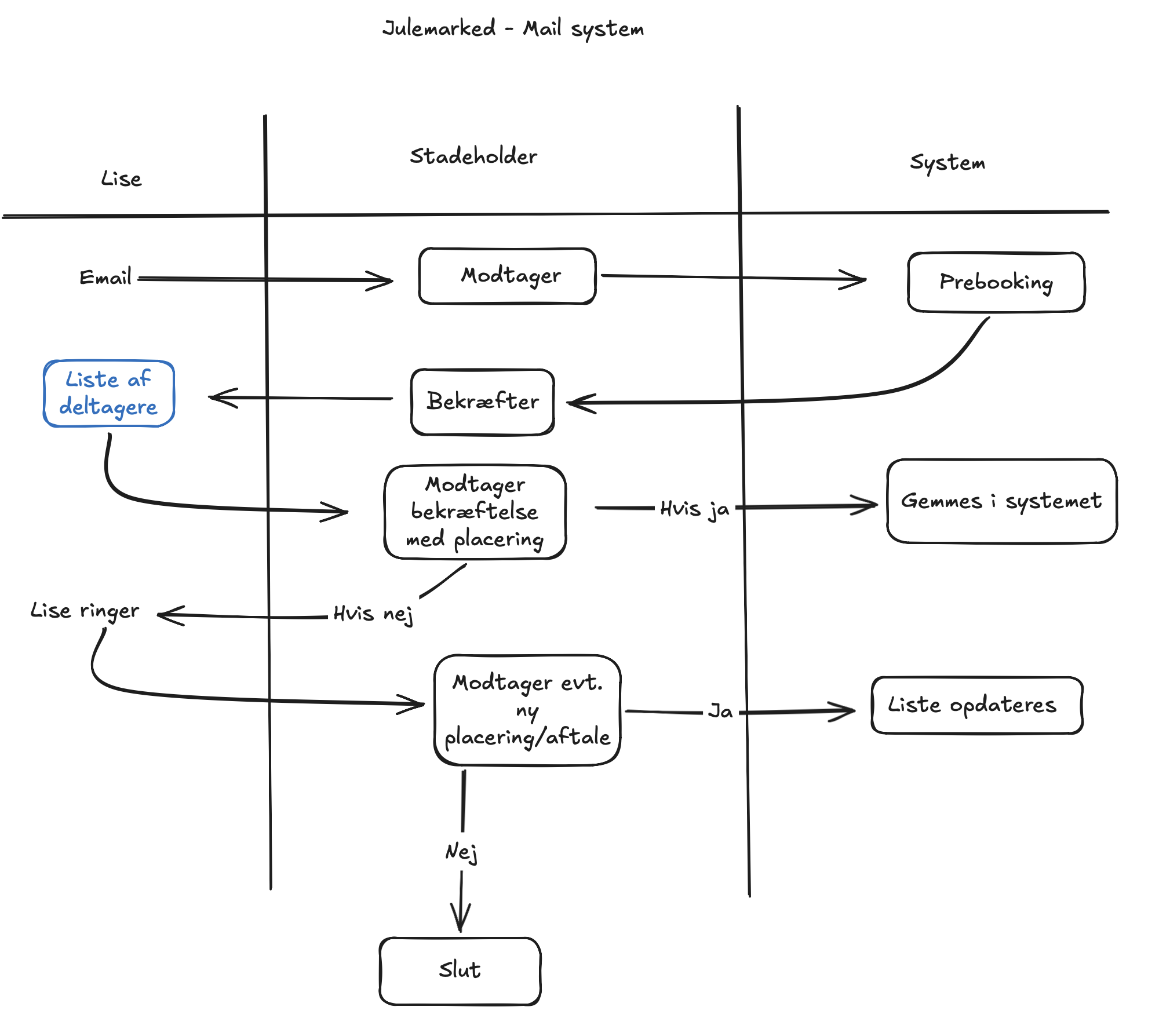
The flow starts with Lise sending an email to a stand holder.
The stand holder receives the email and can confirm that they want to participate.
After that, the system creates a prebooking.
Lise then gets an overview of the participants, and the stand holder receives a confirmation with a suggested placement.
If the stand holder accepts the placement, the information is saved in the system.
If the stand holder does not accept the placement, Lise can contact them and make a new agreement.
If the new placement or agreement is accepted, the list is updated.
This diagram helped us understand that the project is not only about a signup form.
It is also about the communication flow between Lise and the stand holders, and how the system can support that process.
The activity diagram also helped us see that the scope can become bigger than expected. What first looked like a simple mail system actually includes confirmations, placements, manual follow-up, and list updates.
Proposed Solution#
Our proposed solution is a simple booking and administration system for the Christmas market.
The system should include:
- a signup form for stand holders
- a database for storing stand holder information
- an admin page with an overview of all signups
- a status system for approved, pending and rejected stand holders
- a way to register placement wishes
- a way to add internal notes
- a final overview of approved stand holders and their placements
The idea is that stand holders can fill out a form instead of only sending information through email.
Then Lise can see the information in one place and use it to plan the market.
This could reduce the amount of manual work and make the process easier to understand, especially if the task has to be handed over to someone else later.
Main Use Cases#
The project has four main use cases.
1. Stand Holder Signup#
The stand holder should be able to sign up through a simple form.
The form could include:
- name
- company name
- contact information
- what they sell
- preferred placement
- special wishes
- need for tables or chairs
- comments
The form should be easy to use, especially on mobile.
2. Internal Admin Overview#
Lise should have an admin page where she can see all stand holders in one place.
The admin page should show:
- who has signed up
- who is confirmed
- who is missing an answer
- who has special wishes
- where each stand holder is placed
- internal notes
This would reduce the need to search through long email threads.
3. Planning and Placement#
The system should support the planning of stand placements.
In the MVP, this can be simple.
It does not need to be an advanced drag-and-drop map from the beginning.
A first version could use a list or table where Lise can assign or update placement information manually.
Later, this could become a more visual stand map.
4. Communication Support#
The system should support the email workflow, but not necessarily replace it completely.
In the first version, it may be enough that the system helps Lise keep track of who needs a reply and what information is missing.
Later, AI could help generate email drafts, reminders and confirmation messages.
Use of AI#
In this project, we want to use AI in two different ways.
First, we want to use AI code agents to help us build the project.
AI agents can help with:
- creating project structure
- generating code
- debugging errors
- suggesting improvements
- helping with database setup
- testing parts of the code
Second, we want to use AI assistants during the planning and design process.
AI assistants can help us with:
- improving prompts for code agents
- thinking through possible user flows
- suggesting design ideas
- comparing technology choices
- explaining errors
- helping us test if the solution makes sense
At this stage, AI is mainly a development support tool.
We are not planning to build a large AI feature directly into the product from the beginning. The most important thing is first to create a working system that solves the main problem.
Later, AI could maybe be used inside the system to summarize emails, suggest stand placements, or help generate messages to stand holders.
AI Considerations#
AI should only be used where it creates real value.
Possible AI features later could be:
- generating email drafts
- summarizing communication with stand holders
- extracting important information from messages
- suggesting missing information
- helping with placement suggestions
- creating internal summaries for Lise
But AI should not be added just to make the project sound more advanced.
The most important thing is still to solve the real problem: making the Christmas market booking and planning process easier.
Technology Considerations#
We are still considering which technologies to use.
The system needs a frontend, a backend, and a database.
For the frontend, we are considering using a modern web framework such as React, because it makes it easier to build interactive pages and admin interfaces.
For the database, we have considered using Supabase, because it can provide a database and backend features without us having to build everything from scratch.
A possible technology stack could be:
- React for the frontend
- Supabase for database and backend functionality
- GitHub for version control
- GitHub Pages, Vercel, or Netlify for deployment
- AI code agents for development support
Supabase could be useful because it gives us a structured way to store stand holder information.
For example, the database could contain:
- stand holder name
- contact information
- company name
- product type
- special wishes
- preferred placement
- approval status
- notes from Lise
We still need to decide the final stack, but the most important thing is to choose technologies that fit the scope and are realistic for us to build within the project period.
MVP#
Our MVP is the smallest version of the project that we can demonstrate.
The MVP should include:
- a signup page where stand holders can register
- an admin page where Lise can see the registrations
- a database where the information is saved
- a simple status field for pending, approved or rejected stand holders
- a simple way to note placement wishes
- a simple way to add internal notes
This would already solve a big part of the problem, because it gives a better overview and collects the information in one place.
The MVP does not need to include every advanced feature.
The most important thing is that the core flow works:
- A stand holder signs up.
- The information is saved.
- Lise can see the signup.
- Lise can update status and placement.
- The list can be updated.
Scope and Limitations#
To keep the project realistic, we need to limit the scope.
We will not build everything from the beginning.
For the MVP, we will not focus on:
- payment system
- advanced login system
- full security setup
- automatic invoice handling
- advanced stand map editor
- full email automation
- integration with e-conomic
- public website with all stand holders
This does not mean that these things are not important.
It only means that they are outside the first version of the project.
We still need to think about basic data responsibility, because the system may store contact information from stand holders.
But we will not build a complete production-ready security system as part of the MVP.
Questions for the Customer#
Before we can build the best version of the system, we still need answers to some questions.
Important customer questions are:
- Can we get a list of previous stand holders?
- What information should a stand holder provide when signing up?
- What placement wishes should they be able to choose?
- Is there a map or floor plan of the market area?
- How many stands are there room for?
- Which placements are considered the best?
- Should Lise be able to add notes about each stand holder?
- Should returning stand holders be handled differently from new stand holders?
- What should the final overview look like?
- Should the system send emails, or should it only create drafts?
These answers will help us define the final scope and avoid building something that does not match the real workflow.
Assumptions#
Until we get more information, we have to make some assumptions.
We assume that the system should be simple and easy to use.
We also assume that Lise should be able to understand and use the system without needing a lot of technical explanation.
That means the admin page should be clear and not too complicated.
We also assume that it is better to build a small working solution than a large unfinished system.
Because of that, our first version should focus on the most important workflow: signup and overview.
Future Ideas#
If the MVP works well, there are many possible features that could be added later.
Future ideas could include:
- automatic email confirmations
- email drafts for stand holders
- visual stand placement map
- evaluation notes after the event
- returning stand holder database
- filtering by product type
- export to Excel or PDF
- invoice integration
- public page showing approved stand holders
- AI suggestions for stand placement
- AI summary of communication with each stand holder
These features could make the system more useful, but they should not be part of the first version unless we have time.
Definition of Done#
For this project, a good solution is not necessarily the biggest solution.
The project will be successful if it:
- makes signup easier for stand holders
- gives Lise a better overview
- reduces manual work
- collects important information in one place
- supports the placement process
- feels calm, trustworthy and easy to use
- fits the visual style of E.G.
- stays realistic as an MVP
This definition is important because it helps us avoid making the project too large.
The goal is not to build every possible feature.
The goal is to build a useful prototype that clearly demonstrates the core idea.
Next Steps#
Our next steps are:
- Get missing information from Lise.
- Decide the final technology stack.
- Create the project structure.
- Build the signup form.
- Connect the form to a database.
- Build the admin overview.
- Test the flow with example data.
- Improve the design and usability.
- Prepare a demo version.
The first important step is getting more information from the customer, because that will help us avoid making wrong assumptions.
Reflection#
I think this is a good project because it has a real user and a real problem.
It is not just a random app idea. It is connected to a real workflow where a digital solution could reduce manual work and create a better overview.
The Christmas market case is also a good size for a school project. It can start small with a simple MVP, but it also has many possible future improvements.
My biggest focus will be to keep the scope realistic.
It would be easy to add too many features, but then the project could become too large and unfinished.
The most important goal is to build something that works and demonstrates the core idea clearly.
I also think this project is a good opportunity to use AI code agents in a practical way. Instead of only asking AI questions, we can use it to help us structure, build, debug, and improve a real application.
This project will help me practice both technical development and the process of understanding a customer’s needs before choosing a solution.